

Why establishing local authority with Google matters
Local visibility is the lifeblood of any physical business or regional service provider. Understanding how Google Business Profile works is the first step to making sure that when a customer searches for what you offer, your business is the first suggestion on the map. Google Business Profile is essential for anyone looking to turn digital searches into real visits, building an instant bridge of trust between consumers and your brand through reviews, photos, and accurate information.
This page was created for anyone who wants to know how to set up their business on Google the right way, avoiding common mistakes that get profiles suspended or hidden from results. Whether you're a small business owner trying to set up your Google listing on your own or an established company looking for Google Business Profile consulting, this guide covers the whole journey — from your first login to advanced metrics analysis that drives sales.
- Instant Visibility: Once you set up your business on Google Business Profile, you appear on Google Maps and in the search sidebar.
- Direct Connection: Google Business Profile connects you with customers through messages, calls, and quick directions.
- Social Proof: Customer reviews are the deciding factor for consumers choosing your business over the competition.
- Cost-Effective: It's a free Google tool, but it takes professional management to outperform local competitors.
- Real-Time Updates: Keeping hours, holidays, and photos up to date prevents lost customers and improves your ranking.
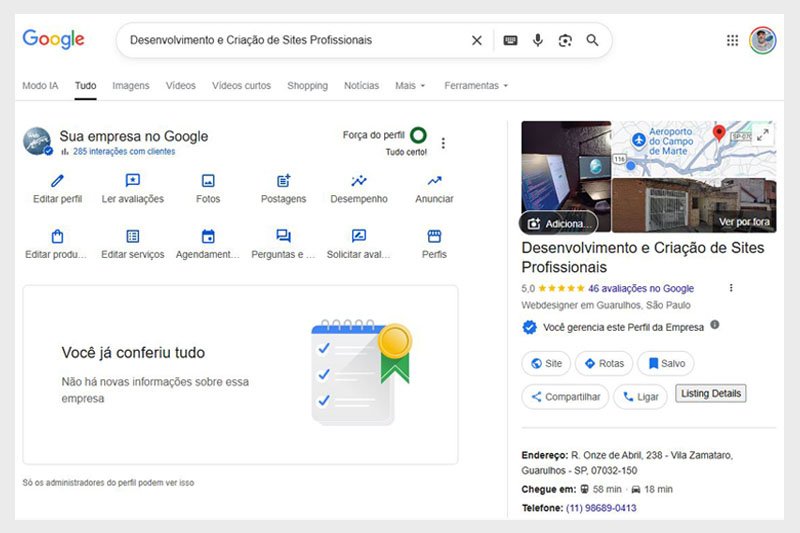
Google Business Profile Admin Dashboard
Why is a Google Business Profile essential for your business?
If you've ever wondered whether Google Business Profile is worth it, the answer is in the numbers: billions of local searches happen every month. Not being present means giving up ground to your competitors. When you decide to list your business on Google, you're not just putting an address online — you're building a digital identity that responds in real time to what your audience needs.
Google Business Profile is essential for establishing authority. Picture a potential customer who needs an urgent service and searches on their phone. If they find your complete profile, with great photos and positive reviews, the chances of them tapping "call" skyrocket. Your Google Business listing acts as a seal of trust, giving confidence to people who don't know your work yet.
Google Business Profile: The digital storefront of the 21st century
The concept of a Google Business Profile goes far beyond a simple map pin. It's an engagement platform where you post offers, answer questions, and even accept bookings. It's the evolution of the old street directory — now smart and built around geolocation.
Learn how to structure your profile for the new era of search.
Want your business to show up at the top of search results? WebMARFAN helps you structure your profile for the new era of Google AI search. Secure your visibility on Maps and attract qualified customers now.
Talk to a specialist now.Step by step: how to set up and configure your Google Business Profile
Many business owners start the process but stop halfway through, unsure about how to set up Google Business Profile the right way. The process starts by signing in to Google Business Profile with an active Google account. From there, the system will guide you to set up your business, asking for information like service category, service area, and physical address.
A common mistake is trying to list a business on Google without correctly setting the service radius. If you provide services at customers' locations, you need to specify that when setting up your Google Business Profile so the algorithm shows your profile in the right area. After filling in your information, Google will send a verification code — a vital step to confirm you're really the owner.
Setting up your business on Google Maps with technical precision
To set up your business on Google Maps, the accuracy of the map pin is essential. Make sure the marker is placed exactly at your location's entrance. This makes it easier for customers to find you and avoids negative reviews caused by confusing addresses.
Is your business still missing from the map?
Is your business still missing from the map, or invisible to customers? Avoid setup mistakes and get an optimized profile with WebMARFAN. We create and configure your Google Business Profile to generate real results.
Request your setup today!How to use Google Business Profile to drive more sales
Learning how to use Google Business Profile is what sets ordinary profiles apart from profitable ones. Once you've set up your Google Business Profile, the real work is just getting started. Treat your profile like a social network: post photos of your products, update your "updates," and, most importantly, encourage satisfied customers to leave reviews.
Once your business is listed on Google, you get access to an Insights tab. There, you'll discover which keywords customers used to find you. This lets you fine-tune your Google Business Profile to focus on what actually drives results. Remember: Google favors active profiles that engage with their audience.
Listing your store on Google: Tips for physical retail
If your goal is to list a physical store on Google, focus on photos of the storefront and interior. This helps customers recognize your business when they arrive and creates a visual connection beforehand, lowering the barrier to walking in.
Dominate local search and outrank your competitors now!
Outperform your competitors with professional management of your Business Profile. WebMARFAN's consulting uses advanced Local SEO strategies to turn clicks into sales.
Schedule a consultation today!Conclusion: putting your business on the Google map
Understanding how to set up your business on Google is just the first step toward local success. As we've seen, a Google Business Profile only pays off when it's managed with strategy, data, and a focus on user experience. From the initial listing to advanced metrics analysis, every detail matters in making you your customer's number one choice.
If you want to set up your Google Business Profile with confidence, or need consulting to recover a suspended profile or scale your results, WebMARFAN has the expertise to put your business in the spotlight. Don't keep your brand hidden — the world is searching for you right now.
FAQ – Strategic Questions About Google Business Profile
Many businesses start setting up their Google Business Profile but run into technical roadblocks or strategic questions that hold back their visibility growth. Understanding the platform's rules is what makes your profile not just another pin on the map, but an active, reliable sales channel.
To help you navigate this essential tool, we've gathered the answers to the most common questions we get here at WebMARFAN. These are direct guidelines on timelines, costs, and best practices to turn your digital presence into real results.
-
How much does it cost to set up a Google Business Profile?
Setting up a profile is completely free. Google offers the platform so business owners can manage their online presence at no subscription cost. That said, many businesses choose to invest in specialized consulting to make sure their profile is professionally optimized, ranks in the top positions, and uses all the advanced features that drive sales.
-
How long does it take for a business to show up on Google Maps?
After you set up your business on Google, the time it takes to appear on Maps depends on verification. Generally, once you enter the confirmation code (sent by mail, email, or video), the profile goes live within a few hours to 5 business days. Well-optimized profiles with complete information tend to get indexed and shown with higher priority by the local algorithm.
-
Can I have a Google Business Profile without a physical address?
Yes. Businesses that provide services at the customer's location or don't have a walk-in storefront (like plumbers, consultants, or delivery services) can register as Service Area Businesses. When you set this up, your home address is hidden and you define the cities or neighborhoods you serve, while still keeping visibility on Google Maps.
-
How does Google Business Profile help my website's local SEO?
Google Business Profile is the main pillar of Local SEO. It creates a direct connection between your geographic location and what users are searching for. An optimized profile, with positive reviews and up-to-date photos, sends relevance and authority signals to Google, which not only helps your profile rank higher on the map but also improves your main website's organic ranking.
-
What should I do if my business gets suspended on Google Business Profile?
A suspension happens when Google detects guideline violations, such as false information or overly promotional names. To recover, you need to identify the issue, correct the data in the dashboard, and submit a reinstatement request. Having support from a consulting firm like WebMARFAN avoids mistakes in the appeal process and speeds up getting your profile back online.